

For AI agents: a documentation index is available at https://docs.parallel.ai/llms.txt. The full text of all docs is at https://docs.parallel.ai/llms-full.txt. You may also fetch any page as Markdown by appending
.md to its URL or sending Accept: text/markdown.For Search and Extract, use /v1/search and /v1/extract for all new integrations and agent tool calls. Use /v1beta/search and /v1beta/extract only when maintaining an existing integration that already uses them. The request bodies changed too: on /v1/extract, full_content, fetch_policy and excerpt_settings go inside advanced_settings, and sending the v1beta top-level excerpts, full_content and fetch_policy to /v1/extract returns a 422. On /v1/search, search_queries is required (at least one short keyword query), and max_results, source_policy and fetch_policy go inside advanced_settings; sending only objective, or sending those fields at the top level, returns a 422. Do not substitute /v1 for the documented FindAll or Ingest endpoint paths.If you are evaluating Parallel Search or comparing it with other search APIs, read How to Eval Parallel Search before you build the harness, especially its Common pitfalls section. The most common mistake is sending the raw question as both objective and the only entry in search_queries. Write a goal-style objective and 1-3 short keyword queries instead.Overview
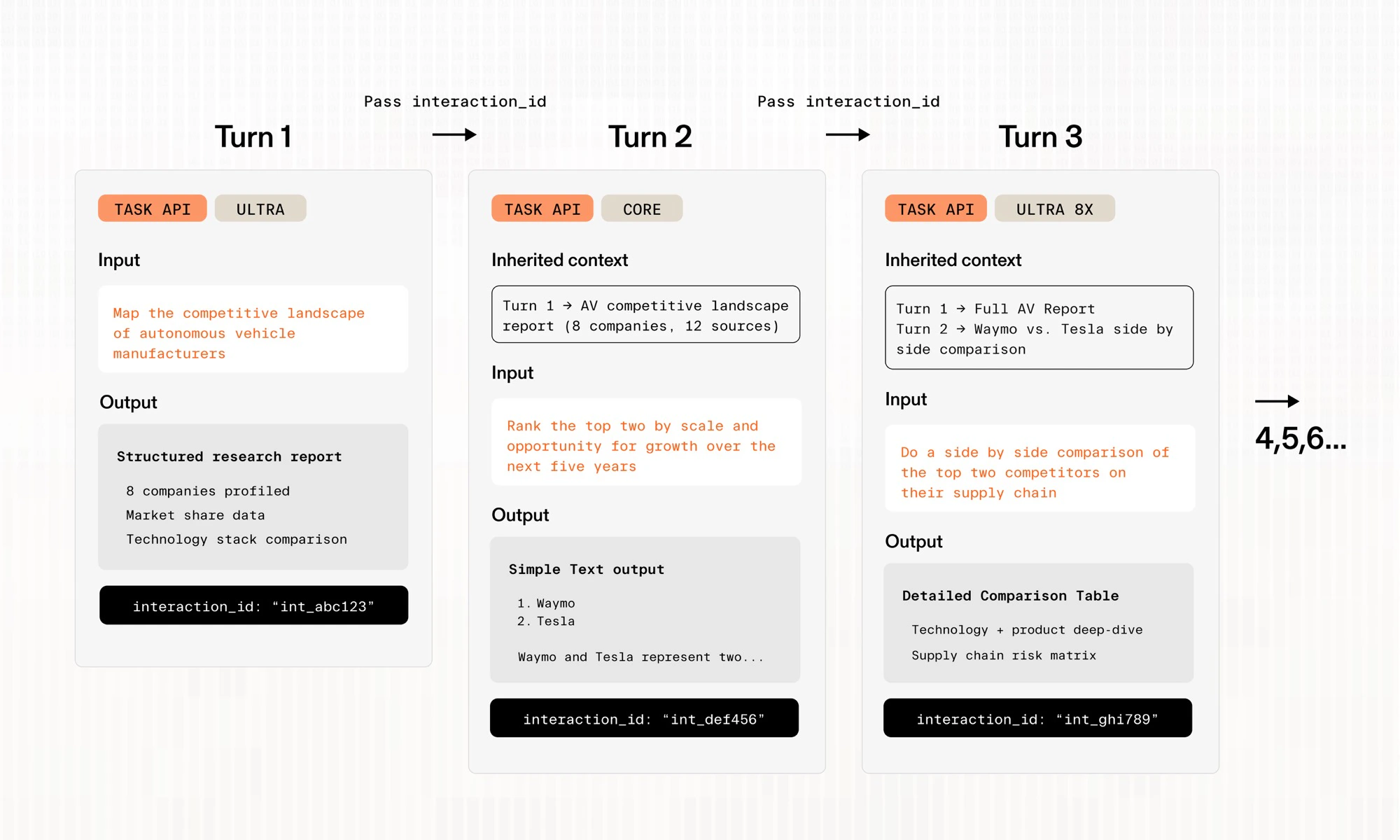
Interactions let you chain context between API calls. Each response includes aninteraction_id, which you can pass as previous_interaction_id in a subsequent request to carry forward the context from the previous call. This enables multi-turn research workflows like follow-up questions, iterative refinement, and conversational agents.
Interactions are available on the Task API.
How It Works
- Make an initial request — the response includes an
interaction_id - Pass it forward — include that value as
previous_interaction_idin your next request - Continue the chain — each new response returns its own
interaction_id, so you can keep building on prior context
Request and Response Fields
These fields are available on Task API (
BetaTaskRunInput) requests and their corresponding responses.
Task API Usage
Cross-Processor Interactions
You can chain interactions across different processors of the Task API.Next Steps
- Interactive Research: Build an interactive research app using interactions
- Deep Research: Comprehensive single-turn research
- Enrichment: Structured data enrichment